†Ûi³ÿßrȬþ; ob_start(); ?> †Ûi³ÿßrȬþ; ob_start(); ?> [phpBB Debug] PHP Warning: in file [ROOT]/includes/session.php on line 1056: Cannot modify header information - headers already sent by (output started at [ROOT]/config.php:19)
[phpBB Debug] PHP Warning: in file [ROOT]/includes/session.php on line 1056: Cannot modify header information - headers already sent by (output started at [ROOT]/config.php:19)
[phpBB Debug] PHP Warning: in file [ROOT]/includes/session.php on line 1056: Cannot modify header information - headers already sent by (output started at [ROOT]/config.php:19)
[phpBB Debug] PHP Warning: in file [ROOT]/includes/bbcode.php on line 488: preg_replace(): The /e modifier is no longer supported, use preg_replace_callback instead
[phpBB Debug] PHP Warning: in file [ROOT]/includes/bbcode.php on line 488: preg_replace(): The /e modifier is no longer supported, use preg_replace_callback instead
[phpBB Debug] PHP Warning: in file [ROOT]/includes/bbcode.php on line 488: preg_replace(): The /e modifier is no longer supported, use preg_replace_callback instead
[phpBB Debug] PHP Warning: in file [ROOT]/includes/bbcode.php on line 488: preg_replace(): The /e modifier is no longer supported, use preg_replace_callback instead
[phpBB Debug] PHP Warning: in file [ROOT]/includes/bbcode.php on line 488: preg_replace(): The /e modifier is no longer supported, use preg_replace_callback instead
[phpBB Debug] PHP Warning: in file [ROOT]/includes/bbcode.php on line 488: preg_replace(): The /e modifier is no longer supported, use preg_replace_callback instead
[phpBB Debug] PHP Warning: in file [ROOT]/includes/bbcode.php on line 488: preg_replace(): The /e modifier is no longer supported, use preg_replace_callback instead
[phpBB Debug] PHP Warning: in file [ROOT]/includes/bbcode.php on line 488: preg_replace(): The /e modifier is no longer supported, use preg_replace_callback instead
[phpBB Debug] PHP Warning: in file [ROOT]/includes/bbcode.php on line 488: preg_replace(): The /e modifier is no longer supported, use preg_replace_callback instead
[phpBB Debug] PHP Warning: in file [ROOT]/includes/bbcode.php on line 488: preg_replace(): The /e modifier is no longer supported, use preg_replace_callback instead
[phpBB Debug] PHP Warning: in file [ROOT]/includes/bbcode.php on line 488: preg_replace(): The /e modifier is no longer supported, use preg_replace_callback instead
[phpBB Debug] PHP Warning: in file [ROOT]/includes/bbcode.php on line 488: preg_replace(): The /e modifier is no longer supported, use preg_replace_callback instead
[phpBB Debug] PHP Warning: in file [ROOT]/includes/bbcode.php on line 488: preg_replace(): The /e modifier is no longer supported, use preg_replace_callback instead
[phpBB Debug] PHP Warning: in file [ROOT]/includes/bbcode.php on line 488: preg_replace(): The /e modifier is no longer supported, use preg_replace_callback instead
[phpBB Debug] PHP Warning: in file [ROOT]/includes/bbcode.php on line 488: preg_replace(): The /e modifier is no longer supported, use preg_replace_callback instead
[phpBB Debug] PHP Warning: in file [ROOT]/includes/bbcode.php on line 488: preg_replace(): The /e modifier is no longer supported, use preg_replace_callback instead
[phpBB Debug] PHP Warning: in file [ROOT]/includes/bbcode.php on line 488: preg_replace(): The /e modifier is no longer supported, use preg_replace_callback instead
[phpBB Debug] PHP Warning: in file [ROOT]/includes/bbcode.php on line 488: preg_replace(): The /e modifier is no longer supported, use preg_replace_callback instead
[phpBB Debug] PHP Warning: in file [ROOT]/includes/bbcode.php on line 488: preg_replace(): The /e modifier is no longer supported, use preg_replace_callback instead
[phpBB Debug] PHP Warning: in file [ROOT]/includes/bbcode.php on line 488: preg_replace(): The /e modifier is no longer supported, use preg_replace_callback instead
[phpBB Debug] PHP Warning: in file [ROOT]/includes/bbcode.php on line 488: preg_replace(): The /e modifier is no longer supported, use preg_replace_callback instead
[phpBB Debug] PHP Warning: in file [ROOT]/includes/bbcode.php on line 488: preg_replace(): The /e modifier is no longer supported, use preg_replace_callback instead
[phpBB Debug] PHP Warning: in file [ROOT]/includes/bbcode.php on line 488: preg_replace(): The /e modifier is no longer supported, use preg_replace_callback instead
[phpBB Debug] PHP Warning: in file [ROOT]/includes/bbcode.php on line 488: preg_replace(): The /e modifier is no longer supported, use preg_replace_callback instead
[phpBB Debug] PHP Warning: in file [ROOT]/includes/bbcode.php on line 488: preg_replace(): The /e modifier is no longer supported, use preg_replace_callback instead
[phpBB Debug] PHP Warning: in file [ROOT]/includes/bbcode.php on line 488: preg_replace(): The /e modifier is no longer supported, use preg_replace_callback instead
[phpBB Debug] PHP Warning: in file [ROOT]/includes/bbcode.php on line 112: preg_replace(): The /e modifier is no longer supported, use preg_replace_callback instead
[phpBB Debug] PHP Warning: in file [ROOT]/includes/bbcode.php on line 112: preg_replace(): The /e modifier is no longer supported, use preg_replace_callback instead
[phpBB Debug] PHP Warning: in file [ROOT]/includes/bbcode.php on line 112: preg_replace(): The /e modifier is no longer supported, use preg_replace_callback instead
[phpBB Debug] PHP Warning: in file [ROOT]/includes/bbcode.php on line 112: preg_replace(): The /e modifier is no longer supported, use preg_replace_callback instead
[phpBB Debug] PHP Warning: in file [ROOT]/includes/bbcode.php on line 112: preg_replace(): The /e modifier is no longer supported, use preg_replace_callback instead
[phpBB Debug] PHP Warning: in file [ROOT]/includes/functions_content.php on line 696: preg_replace(): The /e modifier is no longer supported, use preg_replace_callback instead
[phpBB Debug] PHP Warning: in file [ROOT]/includes/bbcode.php on line 112: preg_replace(): The /e modifier is no longer supported, use preg_replace_callback instead
[phpBB Debug] PHP Warning: in file [ROOT]/includes/functions_content.php on line 696: preg_replace(): The /e modifier is no longer supported, use preg_replace_callback instead
[phpBB Debug] PHP Warning: in file [ROOT]/includes/bbcode.php on line 112: preg_replace(): The /e modifier is no longer supported, use preg_replace_callback instead
[phpBB Debug] PHP Warning: in file [ROOT]/includes/functions_content.php on line 696: preg_replace(): The /e modifier is no longer supported, use preg_replace_callback instead
[phpBB Debug] PHP Warning: in file [ROOT]/includes/bbcode.php on line 112: preg_replace(): The /e modifier is no longer supported, use preg_replace_callback instead
[phpBB Debug] PHP Warning: in file [ROOT]/includes/functions.php on line 4767: Cannot modify header information - headers already sent by (output started at [ROOT]/config.php:19)
[phpBB Debug] PHP Warning: in file [ROOT]/includes/functions.php on line 4769: Cannot modify header information - headers already sent by (output started at [ROOT]/config.php:19)
[phpBB Debug] PHP Warning: in file [ROOT]/includes/functions.php on line 4770: Cannot modify header information - headers already sent by (output started at [ROOT]/config.php:19)
[phpBB Debug] PHP Warning: in file [ROOT]/includes/functions.php on line 4771: Cannot modify header information - headers already sent by (output started at [ROOT]/config.php:19)
Fiesta-Si.com • View topic - Help with ice?
Index Page Find us on Facebook  Find us on twitter  Follow our RSS Feed
It is currently Fri Mar 06, 2026 5:29 pm

All times are UTC [ DST ]


Post new topic Reply to topic  [ 29 posts ]  Go to page 1, 2  Next
Author Message
 Post subject: Help with ice?
PostPosted: Wed Jan 17, 2007 12:14 am 
Offline
FSI Supporter
FSI Supporter

Joined: Sat Sep 16, 2006 9:30 pm
Posts: 300
Location: East London, Drives: 1.6 16v zetec

_________________
Image

Sig. made by xmadxmoex


Top
 Profile  
Reply with quote  
 Post subject:
PostPosted: Wed Jan 17, 2007 12:26 am 
Offline
Banned Member

Joined: Sat Jun 03, 2006 11:48 am
Posts: 7294


Top
 Profile  
Reply with quote  
 Post subject:
PostPosted: Wed Jan 17, 2007 12:39 am 
Offline
FSI Supporter
FSI Supporter

Joined: Sat Sep 16, 2006 9:30 pm
Posts: 300
Location: East London, Drives: 1.6 16v zetec

_________________
Image

Sig. made by xmadxmoex


Top
 Profile  
Reply with quote  
 Post subject:
PostPosted: Wed Jan 17, 2007 12:49 am 
Offline
Banned Member

Joined: Sat Jun 03, 2006 11:48 am
Posts: 7294


Top
 Profile  
Reply with quote  
 Post subject:
PostPosted: Wed Jan 17, 2007 12:14 pm 
Offline
Elite FSI Poster
Elite FSI Poster

Joined: Sun Oct 29, 2006 6:16 pm
Posts: 1725
Location: Wellingborough, Northants.
Drives:

_________________
ImageImage


Top
 Profile  
Reply with quote  
 Post subject:
PostPosted: Wed Jan 17, 2007 1:18 pm 
Offline
FSI Poster
FSI Poster

Joined: Thu Sep 14, 2006 9:14 pm
Posts: 757
Location: Northampton

_________________
Image


Top
 Profile  
Reply with quote  
 Post subject:
PostPosted: Wed Jan 17, 2007 1:22 pm 
Offline
FSI Supporter
FSI Supporter

Joined: Sat Sep 16, 2006 9:30 pm
Posts: 300
Location: East London, Drives: 1.6 16v zetec
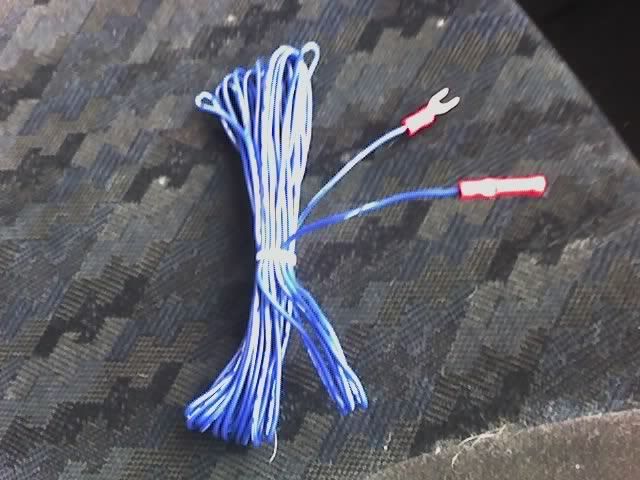
Thanks for the replies, could comeone tell me what this wire is for? the remote lead? what does it do?

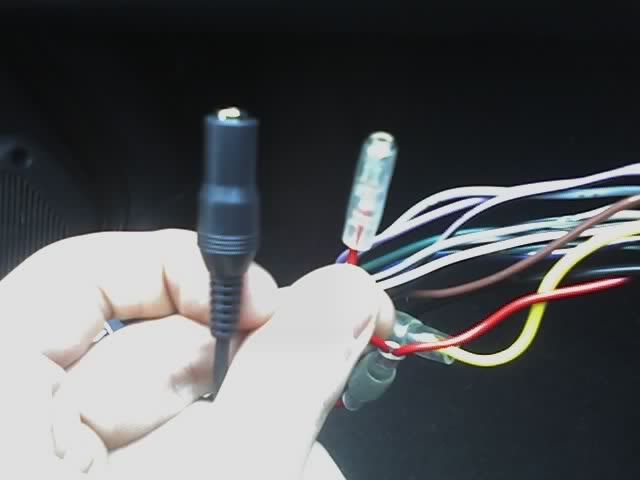
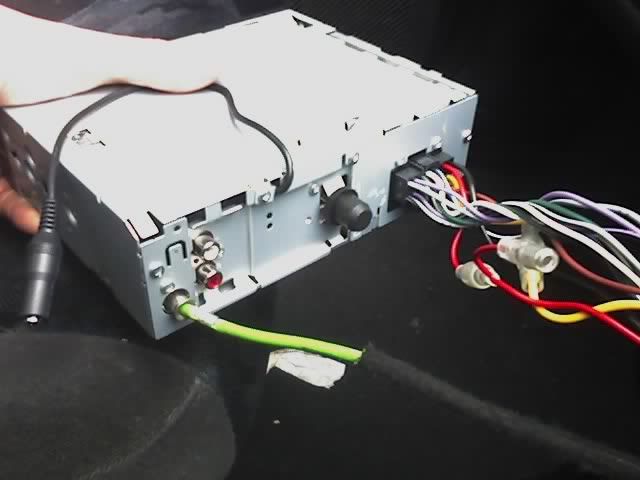
What do i connect it to on my head unit because i dont think mine has anywhere to connect it?

This wire:

Image

Two spare connection on the back of head unit doing nothing, dont look like it fits in here:

Image

Picture of the back of head unit:

Image

THanks

_________________
Image

Sig. made by xmadxmoex


Top
 Profile  
Reply with quote  
 Post subject:
PostPosted: Wed Jan 17, 2007 1:27 pm 
Offline
FSI Poster
FSI Poster

Joined: Thu Sep 14, 2006 9:14 pm
Posts: 757
Location: Northampton
its your amp remote wire, do you have the handbook for the headunit

_________________
Image


Top
 Profile  
Reply with quote  
 Post subject:
PostPosted: Wed Jan 17, 2007 1:30 pm 
Offline
FSI Supporter
FSI Supporter

Joined: Sat Sep 16, 2006 9:30 pm
Posts: 300
Location: East London, Drives: 1.6 16v zetec
Yeh i have but its in German! :D so i can only go by the pictures. What does the remote wire do?

_________________
Image

Sig. made by xmadxmoex


Top
 Profile  
Reply with quote  
 Post subject:
PostPosted: Wed Jan 17, 2007 1:32 pm 
Offline
Elite FSI Poster
Elite FSI Poster

Joined: Sun Oct 29, 2006 6:16 pm
Posts: 1725
Location: Wellingborough, Northants.
Drives:
It runs from the headunit to the amp and just swithces it on and off so it doesn't drain your battery.

_________________
ImageImage


Top
 Profile  
Reply with quote  
 Post subject:
PostPosted: Wed Jan 17, 2007 1:33 pm 
Offline
FSI Poster
FSI Poster

Joined: Thu Sep 14, 2006 9:14 pm
Posts: 757
Location: Northampton
bum, can you take a detailed photo of the wiring for me and also can you include all the wires, sort of separated

basically when you turn the headunit on a small current is sent down the wire, to tell the amp to turn on, it does the same to turn it off

_________________
Image


Top
 Profile  
Reply with quote  
 Post subject:
PostPosted: Wed Jan 17, 2007 1:41 pm 
Offline
FSI Supporter
FSI Supporter

Joined: Sat Sep 16, 2006 9:30 pm
Posts: 300
Location: East London, Drives: 1.6 16v zetec
Right found some english instruction for me head unit, by the sound of it it doesnt come with the remote bit on the back :(

Do you connect the remote lead to its on individual connection on the back of the unit? or using one of them wires that control the power to the stereo, illumination, light and all that? (one of the wires that go through the iso connectors)

_________________
Image

Sig. made by xmadxmoex


Top
 Profile  
Reply with quote  
 Post subject:
PostPosted: Wed Jan 17, 2007 1:49 pm 
Offline
FSI Poster
FSI Poster

Joined: Thu Sep 14, 2006 9:14 pm
Posts: 757
Location: Northampton
Image

the wire will be like this.


what wire does the book say come out of the back of the headunit, also what make and model is the unit

_________________
Image


Top
 Profile  
Reply with quote  
 Post subject:
PostPosted: Wed Jan 17, 2007 1:50 pm 
Offline
Banned Member

Joined: Sat Jun 03, 2006 11:48 am
Posts: 7294
your headunit should have a 'remote out' if it doesnt you can run it from a live on the car via your own switch that you turn on off whenever you like..

or you can run it from an ignition live that come on when you turn the key :D


Top
 Profile  
Reply with quote  
 Post subject:
PostPosted: Wed Jan 17, 2007 2:14 pm 
Offline
Regular Poster
Regular Poster

Joined: Fri Dec 29, 2006 2:42 pm
Posts: 113
Location: cumnock ayrshire
if your head unit does not have a remote wire use the POWER ANTENNA wire , does exactly the same job , all its ther for is to send a signal to the amplifier when you switch on the headunit to tell the amp to turn on , and thats all the power antenna wire does so they are interchangable provided you dont have a power antenna :lol:

HTH

Gav

_________________
Image


Top
 Profile  
Reply with quote  
 Post subject:
PostPosted: Wed Jan 17, 2007 5:05 pm 
Offline
FSI Poster
FSI Poster

Joined: Wed Nov 22, 2006 1:52 am
Posts: 687
Location: Portsmouth
Drives:

_________________
Image


Top
 Profile  
Reply with quote  
 Post subject:
PostPosted: Wed Jan 17, 2007 7:43 pm 
Offline
Regular Poster
Regular Poster

Joined: Wed Nov 29, 2006 5:44 pm
Posts: 198
:) i taped my remote wire in to the power antenna cable from head unit cables should have name printed on the cable i cut the wire in half stripped both ends and used a scotch block and wrapped that in electrical tape works fine now :)

Top
 Profile  
Reply with quote  
 Post subject:
PostPosted: Wed Jan 17, 2007 9:53 pm 
Offline
FSI Supporter
FSI Supporter

Joined: Sat Sep 16, 2006 9:30 pm
Posts: 300
Location: East London, Drives: 1.6 16v zetec

_________________
Image

Sig. made by xmadxmoex


Top
 Profile  
Reply with quote  
 Post subject:
PostPosted: Wed Jan 17, 2007 9:57 pm 
Offline
FSI Poster
FSI Poster

Joined: Thu Sep 14, 2006 9:14 pm
Posts: 757
Location: Northampton
thats the one mate, what unit is it, ill look up a wiring diagram and check for you if you would like me to.
DO NOT CONNECT IT TO THE GREEN CABLE

_________________
Image


Top
 Profile  
Reply with quote  
 Post subject:
PostPosted: Wed Jan 17, 2007 10:32 pm 
Offline
FSI Supporter
FSI Supporter

Joined: Sat Sep 16, 2006 9:30 pm
Posts: 300
Location: East London, Drives: 1.6 16v zetec
Ok, wont connect it to that :)

It a JVC, it either the KD-G322, KD-G321 or the KD-G3.

Not sure which one it is exactly, but the instructions is for them 3 models, so there can't be that much difference with the wiring.

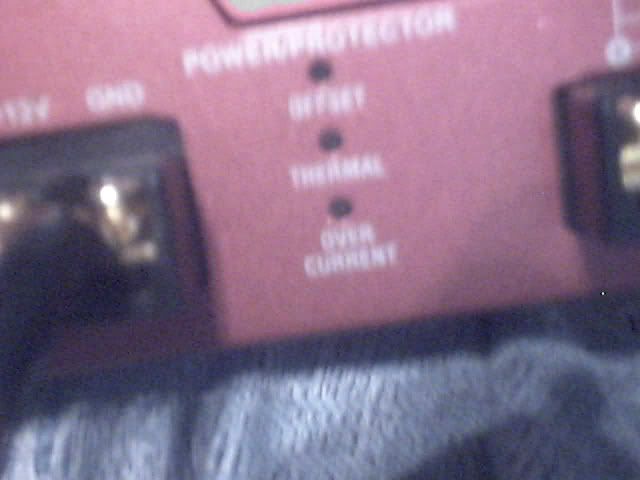
Another probem i am having, i just got a sony xplod sub and amp cheap of someone, and i just wanted to test if the amp was working ok, so i connected the live and ground so should some of these lights come on, or wouldnt i know till i connect the speakers?

Image

_________________
Image

Sig. made by xmadxmoex


Top
 Profile  
Reply with quote  
Display posts from previous:  Sort by  
Post new topic Reply to topic  [ 29 posts ]  Go to page 1, 2  Next

All times are UTC [ DST ]


Who is online

Users browsing this forum: No registered users and 11 guests


You cannot post new topics in this forum
You cannot reply to topics in this forum
You cannot edit your posts in this forum
You cannot delete your posts in this forum
You cannot post attachments in this forum

Search for:
Jump to: